Showing posts with label Mapping. Show all posts

Friday, June 22, 2012

Receiving Learner Feedback: The Angry Customer

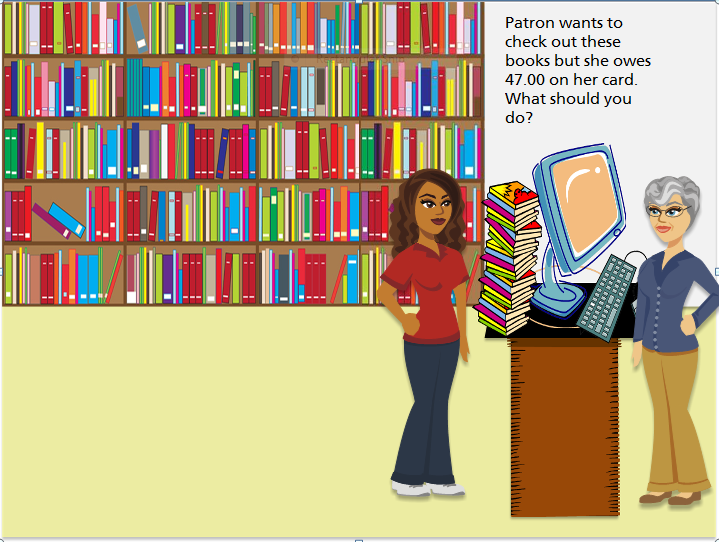
This was one of the slides the users liked....
Yesterday, I had the opportunity to meet with some future users of the "Angry Customer" eLearning module that I've been working on. And once again, it reminded me how important it is to receive feedback as early/often as possible. As I sat down with two end users, they immediately tweaked my scenarios to make then as realistic as possible, and to include more policy ideas. I am grateful for their help, as they will be testing my  prototype once I have revamped it a bit. We had a lot of conversations about how to design the learning module in a way that promoted the ideal behavior (or performance), as well as some negative examples for me to build on.
And then there were ideas that needed revising!
Not only was this meeting a lot of fun, the engagement and feedback also promotes buy-in from the users. I'm excited to take their ideas and build upon them. 

Thursday, June 21, 2012

Prototyping an eLearning Project: The Angry Customer

Thanks to all of you who gave me feedback on my Mapping an eLearning Project post. It's nice to know that I am part of a support system. On that note, I've been working on creating a prototype to take to my "learners" and my stakeholders to review and test. I want to make sure my idea of interactivity matches the expectations of my audience. I also want to make sure my scenario will actually reinforce the actions I want the staff to take. In other words: Will staff behavior change after using this eLearning scenario? I have already brainstormed with my SME, but I want to get a user perspective before I move forward. At this moment, I am using Articulate Storyline to create this module, although I plan to use Captivate and ZebraZapps for others. Additionally, I have some concerns with various software, as I know ahead of time that the users are not allowed to download Flash on their computers. The organization does not have an LMS either, so I will have to publish the scenarios in an accessible way.
One of the branches that I created.
I've added some of the background slides to test them.
So let's get to it: One of the reasons I am enjoying Storyline is that it really connects with the creative and imaginative side of my personality. You can begin to see the fun I'm having with just a small screenshot of the Storyview. Branches and triggers are easy to add, and the illustrated characters are dynamic. Here is an example of the prototyping idea:
I have used very basic shapes as placeholders.
Later, I will add the backgrounds, like the example below:
This was created using Tom Kuhlman's approach to ungrouping clip art!
(Obviously I need to resize the computer!)
I will wait to create more backgrounds until I have tested the interactivity and script of the project. Even though I have a limited number of backgrounds for this project, it still takes some time to create each one. It makes no sense to do that until the prototype is approved by the very people who will be using it--the learners

Sunday, June 10, 2012

Mapping an eLearning Project: The Angry Customer

My Mapping technique: butcher block paper + post-its,
markers, + Pencil with a good eraser!
As I am developing my portfolio, I've chosen one topic to develop into various eLearning samples. If all goes well, I will be donating my work to a local public organization. This post is one of the first I will be writing to support this process. I've been playing with various ways to map out an eLearning project. My current favorite is to use butcher block paper across my desk and to supplement that with post-its, colorful markers and more. We all use different processes to support our creativity, but this works well for me. After playing around with various techniques, I found that it worked well for me to show each branch in a different color. 
From the map above, it looked like I had tons of scenes, but it's really
only eight that can be customized.
I can then work on giving my characters
a unique personality--or rethinking their importance
The nice part about doing it this way is that I can see how many actual "scenes" I need to create as well as how many characters I need. This brainstorming works best for me if I am developing a more linear scenario. If I am using one or two basic screens, and developing most of the interactivity into those, I would use a different concept. What ways do you use? Next post: Prototyping an eLearning Project